
Usually, it is a filter life indicator signaling that the internal timer has reached its limit. It may also indicate a clogged air quality sensor that needs a quick wipe to function correctly.
2. How do I turn off the red light?
Perform a manual reset. This typically involves pressing and holding the “Filter” or “Power” button for 3 to 10 seconds until you hear a beep or see the light stop flashing.
3. Is my air purifier broken?
Rarely. If the unit still moves air, the motor is likely fine. Try a hard power cycle by unplugging the unit for 10 minutes to clear any digital “glitches” in the system board.
4. What if the light persists?
If the light remains on after a filter reset and sensor cleaning, you may have a faulty sensor module or an internal connection issue. Contact the manufacturer support for warranty assistance.
You wake up in the middle of the night to a soft, rhythmic flashing light coming from the corner of your room. Your air purifier, which has been humming along silently for months, is suddenly blinking red. It is a common source of frustration, often leading people to think their expensive machine has simply stopped working or suffered a major mechanical failure.
The truth is much simpler. In the vast majority of cases, that blinking red light is just a scheduled maintenance reminder or a minor sensor glitch rather than a broken device. You don’t need a technician or a replacement unit; you just need a few minutes of your time to reset the system and clear out the dust. This guide walks you through exactly why your purifier is acting up and how to restore your clean air environment quickly.
What a Blinking Red Light Actually Means
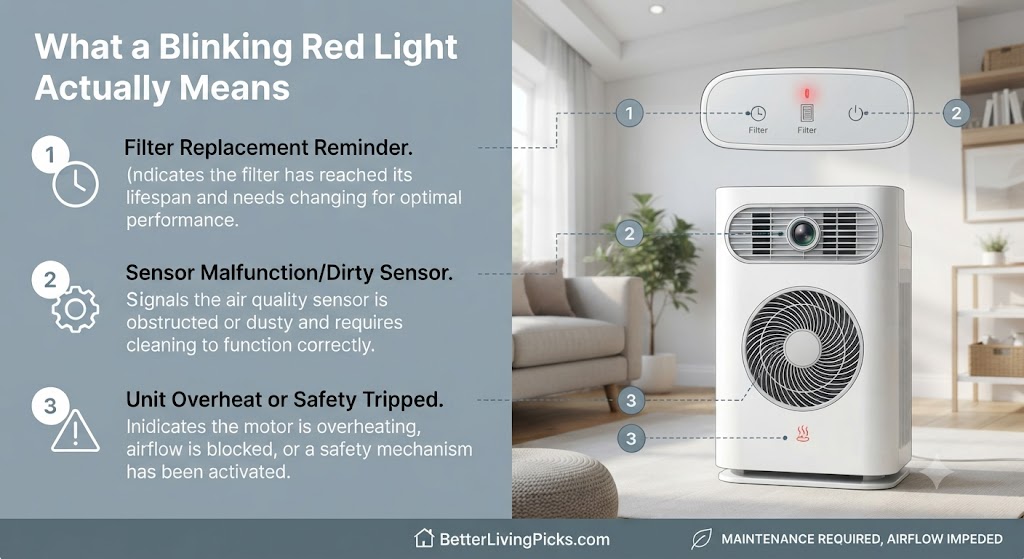
You don’t need to be an engineer to understand your air purifier. Most modern units use a simple timer-based system or a particle sensor to trigger that red light. Understanding which one is responsible makes the fix much easier. When you notice that ominous glow, do not jump to the conclusion that you need a new unit. Instead, consider the logic programmed into the device.
The “Filter Life” Reminder
This is the most common reason for that annoying flash. Most units are programmed to count down a specific number of hours, usually around 2,000 to 3,000 hours of operation. Once that timer hits zero, the machine assumes your filter is clogged with dust and dander, regardless of its actual state.
It is an automated nudge to maintain your indoor air quality. The machine does not “know” if the filter is actually dirty; it only knows how long it has been running. You must manually clear this timer once you swap in a new filter or give the old one a good vacuum. Many people ignore this light for weeks, but doing so can actually reduce the machine’s efficiency, as it might limit fan speed or power output until the reset occurs.
Sensor Obstruction or Dust Buildup
Some higher-end purifiers use laser or infrared sensors to monitor your air quality in real-time. If these sensors get covered in a thick layer of dust, they cannot “see” the air particles correctly. This often causes the unit to blink red, signaling that it is confused by the environment.
Think of it like a camera lens covered in grime. If the sensor can’t get a clear reading, it defaults to a warning light. Cleaning these sensors is a quick, often overlooked task that solves the problem without costing you a cent. When the air quality sensor detects a high level of particulate matter continuously, the device may ramp up to its highest fan speed and trigger a warning light to alert you that the air is severely polluted.
Internal Mechanical Safety Triggers
Occasionally, the red light is a safety signal. If the unit detects that the internal fan is struggling to rotate, or if the filter cover is not properly seated, it may trigger a red light as a safety precaution. This prevents the motor from burning out due to excessive strain. Always check that your filter is inserted in the correct orientation; even a slightly crooked filter can trigger a safety sensor that forces the device into a warning state.
Step-by-Step Troubleshooting Guide

When the light starts flashing, work through these steps in order. This process usually fixes about 95% of all reported issues. Do not get frustrated if the first attempt does not resolve the problem; consistency and attention to detail are your best tools.
Resetting the Filter Indicator
Every brand has a slightly different secret handshake to reset the light. Once you have replaced the filter or vacuumed the existing one if it still looks clean, you need to tell the machine you have done the work.
- Consult the manual first: Even if you think you know the steps, some models require a specific sequence, like turning the unit off, holding the button, and then turning it back on.
- Locate the “Filter” or “Reset” button: This is often a recessed button that you may need a paperclip to press, or a large, prominent button on the main control panel.
- Hold the button down: This usually needs to be done for 3 to 10 seconds. Do not let go until you hear a beep or see a light confirmation.
- Check the filter door: If your unit has a magnetic door or a locking mechanism, ensure the door is fully flush. If the door isn’t closed properly, no amount of button-pressing will reset the internal logic.
Cleaning the Air Quality Sensors
If you have already reset the filter timer and the red light persists, it is time to clean the sensors. Locate the small door or panel on the side of the unit it is usually labeled “Sensor.”
- Locate the sensor housing: This is often found on the side or the rear of the device.
- Open the cover: Use a gentle touch. Some covers slide off, while others have a small latch.
- Wipe the sensor lens: Use a clean, dry cotton swab. If the lens is very grimy, you can use a tiny drop of rubbing alcohol on the swab, but ensure the lens is completely dry before closing the cover.
- Clear the intake: Use a vacuum hose attachment or a soft brush to clear any lint or hair from the holes surrounding the sensor housing. Clogged intake holes are often mistaken for a faulty sensor.
Inspecting for Physical Blockages
Sometimes the red light is not a digital error but a physical one. If the machine is pressed too close to a wall, it cannot pull in enough air. This causes the motor to work harder, which may trigger an overheat warning or a “check airflow” alert.
- Maintain Clearance: Ensure there is at least 12 to 18 inches of clearance on all sides of the unit. Placing a purifier in a tight corner is the fastest way to kill its efficiency.
- Check for debris: Inspect the primary intake grill. Pet hair, dust bunnies, or even plastic packaging can get stuck here. If the intake is blocked, the machine will struggle to reach the target air quality level, keeping the light red.
- Validate the filter position: If you recently changed the filter, double-check that the pull-tab is facing outward and the filter is centered. A filter that is not perfectly centered can cause an air leak, which messes up the internal sensors.
When the Red Light Won’t Turn Off

If you have performed the reset and cleaned the sensors, yet the red light continues to taunt you, the issue might be internal. This is when most people start to panic, but stay calm there are still steps to take.
The Power Cycle Technique
Electronics are prone to temporary glitches just like your computer. Sometimes the internal circuit board gets “stuck” in an error loop.
- Perform a hard reset: Turn the unit off and pull the plug from the wall.
- Drain the capacitor: While the unit is unplugged, hold down the power button for 20 seconds. This helps discharge any residual energy left in the capacitors.
- Wait: Leave the unit unplugged for at least 5 to 10 minutes.
- Reboot: Plug the unit back in and turn it on. This forces the device to perform a fresh boot, which often clears stubborn error flags that a standard button reset cannot fix.
Checking for Genuine Hardware Faults
If the power cycle fails, you might be looking at a faulty sensor or a burnt-out circuit board. If the unit is still under warranty, do not attempt to unscrew the casing or open the main body. Opening the unit can void your warranty and leave you with a useless piece of hardware.
Instead, reach out to the manufacturer’s customer service department. When you call or email, provide your model number and the specific blinking pattern of the light (e.g., constant red, slow blink, fast strobe). Manufacturers often have a “secret” knowledge base for specific blinking patterns that are not listed in the standard user manual. They may offer a replacement unit or send you a new sensor module if the model is designed to be user-serviceable.
Preventing Future Red Light Alerts
Consistency is the best way to keep your air purifier running smoothly and your lights green. If you treat your machine like a long-term appliance, it will reward you with clean, quiet air for years.
- Establish a cleaning routine: Mark your calendar for a monthly check-up. Vacuuming your pre-filter every 30 days is the single most effective way to prevent premature “replace filter” alerts.
- Mind the placement: Never place your purifier behind curtains or furniture. It needs to breathe. The more airflow it has, the less strain there is on the motor and sensors.
- Watch the humidity: High humidity can sometimes cause dust to clump on your filter or sensors, triggering a false “dirty” alert. If you live in a very humid climate, consider using a dehumidifier in the same room to help your air purifier maintain optimal function.
- Manage Pet Dander: If you have pets, they are your machine’s biggest adversary. Pet hair is heavy and can clog sensors within days. If you find your light is constantly blinking red, you likely need to move to a bi-weekly cleaning schedule for the intake grill.
Frequently Asked Questions
Can I just bypass the red light and keep using my old filter?
Technically, yes, you can ignore the light, but your air quality will suffer significantly. A clogged filter restricts airflow, forcing your motor to work harder, which consumes more energy and can lead to premature motor failure. It is better to vacuum the filter if you cannot replace it immediately to restore some airflow.
Why does my purifier blink red even with a brand new filter?
This happens because the internal timer doesn’t know the filter is new. You must manually perform the reset sequence after every filter change. If you don’t perform this action, the machine continues its countdown based on the old filter’s usage data.
Is it safe to leave the air purifier running while the red light is on?
Most of the time, yes. If the red light is just a timer alert, the machine is still cleaning the air, albeit perhaps less efficiently. However, if the light is red due to a sensor error or restricted airflow, the unit may not be cleaning the air correctly, rendering it effectively useless until you fix the blockage or error.
How often should I actually replace my filters?
Standard HEPA filters usually need changing every 6 to 12 months, depending on usage intensity and your home’s air quality. If you have pets, live in a high-traffic urban area, or have severe allergies, aim for the 6-month mark to keep your air clean and your alerts away.
Will vacuuming my filter damage it?
Not if you are careful. Use the brush attachment on your vacuum and use light, sweeping motions on the outer layer. Never use water, soap, or harsh chemicals on a HEPA filter, as this will destroy the filtration fibers and permanently ruin the unit’s ability to trap fine particles.
What should I do if the light is red and the fan won’t turn on?
This indicates a serious fault, likely a safety trigger or a major electrical failure. Check the power cord connection first, then look for a safety switch inside the filter door, this button must be pressed down for the unit to receive power. If everything looks secure, it is time to contact the manufacturer for a potential warranty claim.
Final Thoughts
Seeing a red light on your air purifier is rarely a reason to worry. In most cases, it is simply your machine’s way of asking for a quick bit of maintenance. By following these simple steps, resetting the timer, cleaning the sensors, and ensuring proper airflow, you will likely have your unit back in business in minutes.
Developing a habit of checking your pre-filter monthly and keeping the area around your unit clear will prevent these lights from appearing in the first place. Your air purifier is designed to work hard for you, but it needs a little cooperation. Keep up with that routine maintenance, and you can get back to breathing easy without any more mysterious warning lights interrupting your day.