
Perform a physical bolt-check and visual inspection every 3 to 6 months. If your workspace is in a high-traffic area, apply silicone-based lubricant to the lifting columns once every 6–12 months to prevent friction buildup.
2. Why is my desk making a grinding noise?
Grinding is usually caused by dry, clogged lifting columns or loose frame hardware vibrating under load. Clean the columns thoroughly, re-lubricate with food-grade silicone, and ensure every bolt on the frame is tightened.
3. Can I fix an uneven standing desk?
Yes, desks often become uneven due to calibration drift or sensor misalignment. Perform a hard factory reset by holding the “down” button for 10-20 seconds until the desk hits its lowest point and clicks, re-aligning the motors.
4. Is overloading the motor really that bad?
Yes, exceeding weight capacity causes the internal gear teeth to strip or bind. Constant overloading forces the motor to overheat, which degrades the internal drive mechanism and significantly shortens the lifespan of your expensive desk.
Most people treat their standing desk like a permanent piece of office furniture, forgetting that it’s actually a sophisticated piece of industrial machinery. Every time you touch that height adjustment button, you are initiating a coordinated mechanical dance between electric motors, gearboxes, and steel lifting columns. When you hear a grinding noise or notice the desk stuttering, the motor is often already struggling under years of neglected maintenance.
The good news is that keeping your desk in top shape doesn’t require a degree in mechanical engineering. By following a few simple, recurring habits, such as managing weight distribution, keeping the lifting columns clear of dust, and understanding the duty cycle of your specific model, you can easily double the lifespan of your desk’s lifting mechanism.
Why Standing Desk Motors Fail Prematurely

We often assume a desk is a “set it and forget it” tool. But that motor is working hard every time you switch positions. When it fails, it is usually because of common user habits that put unnecessary stress on the internal components. Understanding these stressors is the first step toward long-term ownership.
The Dangers of Overloading Your Desk
Every desk has a specific weight capacity for a reason. If you stack heavy monitor arms, desktop PCs, power bars, and heavy sound equipment on your surface, you are pushing that motor to its absolute limit.
When a motor is consistently working at 90% capacity, it creates excessive internal heat. This creates rapid wear on the internal plastic or metal gears. Over time, those gears lose their teeth or bind up completely, leaving your desk stuck in one position. Always check your manufacturer’s weight limit and remember that the desk surface itself also counts toward that total.
The Impact of Uneven Weight Distribution
Think of your desk legs like the shock absorbers on a car. If you keep all your heavy equipment on one side of the desk, you are putting significantly more strain on one motor column than the other.
This creates “column drag.” One side works harder to lift the weight, causing the system to tilt slightly. Over time, this imbalance stresses the internal synchronization sensors. When the sensors detect a mismatch in movement speed, the control box may shut down the motor for safety, leaving you with an error code that won’t go away.
Duty Cycle: Why You Can’t Adjust Height Constantly
Most standing desk motors have a “duty cycle.” This is the ratio of how long the motor runs versus how long it needs to rest to dissipate heat. Manufacturers often set this to something like 2 minutes of movement for every 18 minutes of rest.
If you are constantly moving the desk up and down to fidget, you are forcing the motor to bypass its cool-down period. This builds up heat in the motor windings. If you notice your desk stopped working after a rapid adjustment session, it likely tripped an internal thermal fuse to protect itself from burning out. If this happens, you must wait at least 20 minutes before attempting to use the desk again.
Environmental Factors You Are Ignoring
The environment where your desk sits also impacts the motor. If your home office is particularly dusty, those particles act like sandpaper when they get into the lifting column seals.
Furthermore, high humidity can cause minor oxidation on the internal electrical connections of the control box. Keeping your office space climate-controlled and vacuuming the floor area under your desk regularly is a simple but overlooked maintenance task that keeps debris out of the mechanical drive system.
Routine Maintenance Steps to Extend Motor Life

You do not need special tools to keep your desk running smoothly. A little bit of attention twice a year prevents most common hardware failures before they even start.
Tightening Bolts and Structural Hardware
Vibrations from the motor travel through the frame every single day. This slowly loosens the bolts that hold your desk together. A desk with loose hardware forces the motor to fight against frame instability while it tries to lift.
- Check the frame: Grab an Allen wrench and check every bolt on the frame, crossbar, and feet.
- Target the joints: Focus specifically on the connections between the lifting columns and the desk feet.
- The “Wobble” Test: If you notice your desk wobbling significantly when you lean on it, it means the structure is loose. Tightening these bolts allows the motors to lift straight up, reducing the shear force on the drive screws.
Cleaning the Lifting Columns and Rails
Dust, pet hair, and lint are the enemies of a smooth lift. These particles settle into the grooves of the lifting columns. When the desk rises, that dust gets pulled into the internal seals and drive gears.
- Dry clean first: Wipe down the exterior of the columns with a dry microfiber cloth.
- Vacuuming: Use a vacuum attachment to clear out any visible dust around the base where the column meets the floor.
- Never use liquids: Never use harsh chemicals or wet cleaners, as moisture can seep into the electrical housing and ruin the motor or control board.
- Frequency: If you own a pet, do this once every 3 months. In a pet-free home, every 6 months is sufficient.
Lubricating the Drive System
If your desk starts sounding like an old door hinge, the internal glide pads or drive screws are running dry. This friction will eventually strip the plastic gears, which is often a terminal failure for the desk.
- Choose the right product: Use a 100% silicone-based lubricant spray. Never use WD-40, as it is a solvent and will actually degrade the internal components over time.
- The Process: Extend the desk to its highest position.
- Application: Apply a very light coating of spray to the visible column seams.
- Distribution: Run the desk up and down 3–5 times to distribute the grease evenly. Do not over-saturate; a light mist is more than enough.
Troubleshooting Common Motor Issues

If your desk acts up, don’t panic. Most problems are software-related or simple calibration errors, not a total motor failure.
How to Perform a Hard Reset/Calibration
When the two legs get out of sync, the desk will tilt or stop moving entirely. A hard reset forces the control box to re-learn the “floor” position for both legs and re-sync the encoders.
- Clear the desk: Remove all heavy items from the surface.
- Go to bottom: Press and hold the “Down” button until the desk reaches its lowest position.
- The Trigger: Release, then press and hold the “Down” button again for about 10–15 seconds.
- The Result: The desk will usually dip down slightly and come back up, or make a clicking sound to signify that the reset is complete.
Identifying When the Control Box or Motor is Failing
Sometimes the motor is truly dying. You can usually tell the difference by listening to the sound of the motor and looking at the handset.
- Consistent grinding: This is almost always a lack of lubrication or a mechanical obstruction in the column.
- High-pitched whining: This suggests the motor is struggling to carry a load that is too heavy, indicating a potential stall.
- Total silence: If you hit the button and get absolutely no response and you have confirmed power is reaching the outlet, the control box or the internal motor windings have likely failed.
- Checking cables: Before concluding the motor is dead, inspect the cable connections. Often, a cable wiggles loose from the control box due to repeated desk movement. Push every connector firmly into the control box to ensure they are seated.
Signs Your Desk Needs Immediate Attention
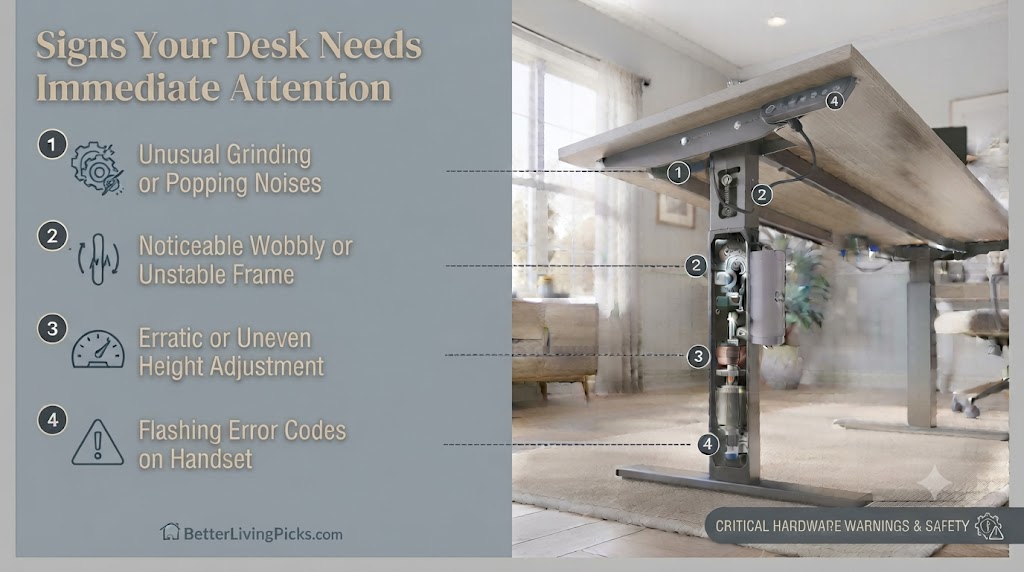
Catching an issue early is the difference between a quick clean and a full desk replacement. Here is what you need to look out for.
Unusual Noises or Grinding Sounds
A healthy desk motor should sound like a quiet, smooth hum. Any sound that resembles grinding, popping, or metallic screeching means metal is rubbing against metal or that a gear tooth is chipped. Stop using the desk immediately and perform a cleaning and lubrication check. If the noise persists after lubrication, stop using the desk and contact the manufacturer.
Erratic or Uneven Movement
If one side of your desk is lagging behind the other, the system is struggling to stay synchronized. This is a red flag that the weight is distributed poorly or the internal sensors are failing to communicate with the control box. Ignoring this leads to the desk becoming permanently crooked.
Error Codes on the Handset
If your handset displays codes like “E01,” “E02,” or “HOT,” your desk is telling you exactly what is wrong. Check your manual, these codes often refer to thermal protection (the desk is too hot) or a collision detection error. Never ignore these codes or force the desk to move; you could blow the motor controller board.
Frequently Asked Questions
How do I know if I have exceeded my desk’s weight limit?
You will hear the motor change tone, becoming significantly louder or slower than it was when the desk was empty. If the desk stops mid-lift or fails to start from a seated position, you have likely exceeded the safe operating weight and need to remove items immediately.
Can I replace just the motor if it breaks?
It depends on the manufacturer. Many standing desk companies use proprietary motor units integrated into the legs, making them difficult to swap. Check if your brand sells replacement “lifting columns” or if they offer a full frame warranty before you try to source aftermarket parts.
What should I do if my desk is stuck in the ‘up’ position?
Most desks have a “collision sensor” that triggers if the desk hits something while moving. Try to unplug the desk for 60 seconds to clear the control box memory, then plug it back in and try to lower it slowly. If it refuses to move, you may need to manually level the desk by turning the lead screws inside the columns.
Do I need to grease the internal drive screw or just the outside?
You generally only need to lubricate the exterior columns and the glide pads. The internal drive screw is often factory-greased for life. If you decide to open the motor housing to reach the internal screw, be aware that you will likely void your warranty.
Is it bad to leave my standing desk at the standing height all day?
It is perfectly fine to leave the desk elevated. The weight is supported by the internal gear system, which is designed to hold weight in a static position. The motor only experiences wear and tear when it is actually moving, not while it is stationary.
Will unplugging my desk during a storm protect the motor?
Yes. Standing desk motors are controlled by sensitive electronic circuit boards. A power surge from a lightning strike or grid fluctuation can fry the controller board instantly. If you have expensive equipment on your desk, keeping it plugged into a high-quality surge protector is a smart insurance policy.
Final Thought
Maintaining your standing desk motor is one of those small, low-effort chores that pays off in a big way over the long run. By keeping the frame clean, tightening the hardware occasionally, and being mindful of how you distribute your gear, you prevent the most common mechanical failures that send perfectly good desks to the landfill. Treat your desk like the precision tool it is, and it will keep supporting your work and your health for years to come.